I2C Language
This API allows one to construct arbitrary I2C transactions in a very intuitive way. It relies on the Python type system (such as it is) to constrain function calls only to valid set in the valid order. Thus making it impossible to construct an invalid I2C transaction. Each part of the transaction is a function call which can be chained with a next valid function call. For example lets create a transaction object to read from slave device at address 0x42 one byte register with register address 0x7.
from i2c_api import I2CTransactionBuilder

i2c = I2CTransactionBuilder()
read_reg_transaction = i2c.start().address(0x42).write(0x7).restart().address(0x42).read(1).stop()
Returned object read_reg_transaction is an instance of I2CTransaction class. If we print this object it will look
like so:
S().Address(0x42).W().Data(0x07).Sr().Address(0x42).Read(1).P()
Where W() is an indication of the write bit and Data(0x07) is one byte to be sent from the master to the slave
device at Address(0x42). Call Read(1) means read one byte from the slave. Valid chain of these
function calls can be represented like so:
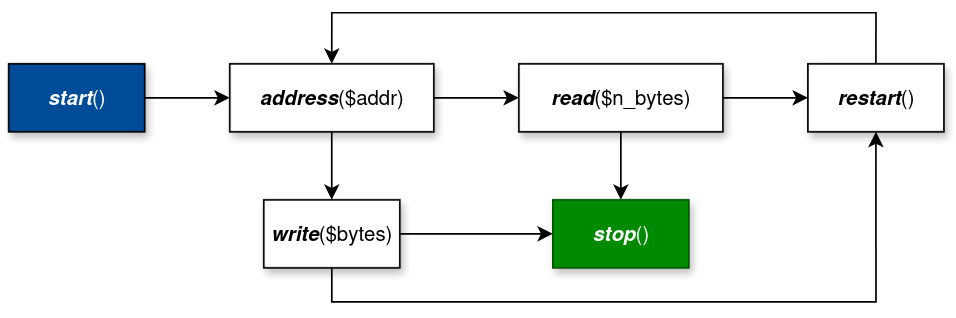
This transaction can be executed in two ways with the help of I2CMaster class.
from i2c_api import I2CMaster, ExecResults

master = I2CMaster()

results: ExecResults = master.exec(read_reg_transaction)
results: ExecResults = read_reg_transaction.exec(master)
Note, that instance of I2CMaster is to be obtained from another library where it is implemented for your specific
dongle. For the sake of flow though we simply write above master = I2CMaster() even
though that is invalid since I2CMaster is an abstract class.
Variable results is an instance of ExecResults named tuple. Which for the above
example you can access like so:
match results:
    case ExecResults(_, True):
        print(f"Success {results.values()[0]}")

    case ExecResults(_, False):
        print("I2C transaction failed")
Calling results.values() returns list of BitArray where each element corresponds
to each appearance of read($n_bytes) call. In the above example we have only one read operation,
hence if result is successful, then there is just one element in the .values() list.
To write into a register we can construct transaction object like so
from i2c_api import I2CTransactionBuilder

i2c = I2CTransactionBuilder()
write_reg_transaction = i2c.start().address().write([0x7, 0x11]).stop()
If we print above transaction we will see
S().Address(auto).W().Data(0x07).Data(0x11).P()
Notice that we did not pass slave address in the address() function call, hence in string above
it says Address(auto). This allows us to assemble transactions without reference
to a particular slave device address. This means that this address would have to be supplied when
we execute this transaction.
results = write_reg_transaction.exec(master, 0x42)

results = master.exec(write_reg_transaction, 0x42)
Address passed to the exec(...) function will be applied only to the unfilled address() calls.
Write transaction above does not have any read operation, hence we need to check only if it was a successful or not like so
_, is_success = write_reg_transaction.exec(master, 0x42)

_, is_success = master.exec(write_reg_transaction, 0x42)
Transaction object can be serialized to json, saved to some permanent store and then later restored like so:
from i2c_api import I2CTransaction

tr_json_str = I2CTransaction.to_json(write_reg_transaction)
transaction = I2CTransaction.from_json(tr_json_str)